Everything FinVault can do

33 finance calculators, month-by-month schedules, alarm-style reminders, income & expense records, saved history and sharing, in one private Android app that works offline.

Calculators

33 calculators for real money decisions

From an EMI before you sign a loan to your Zakat at the end of the year, every calculator gives you a clear headline figure and a full breakdown.
  • Five categories. Loans (10), Savings (5), Investments (5), Tax & Business (7) and Personal Finance (6).
  • Fast search. Find a tool by name, category or keyword, such as “debt burden” or “recurring deposit”.
  • Flexible tenure. Enter durations in months or years. DPS also accepts days, from 90 days.
  • Accurate maths. Calculations use decimal arithmetic for money, not floating point.
  • Helpful validation. Missing, negative or impossible inputs are explained right under the form.
  • Your inputs are kept. Entered values survive switching apps, so you don't lose your work.
  • Quick Access & Most Used. The home screen shows your favourite tools based on what you save.
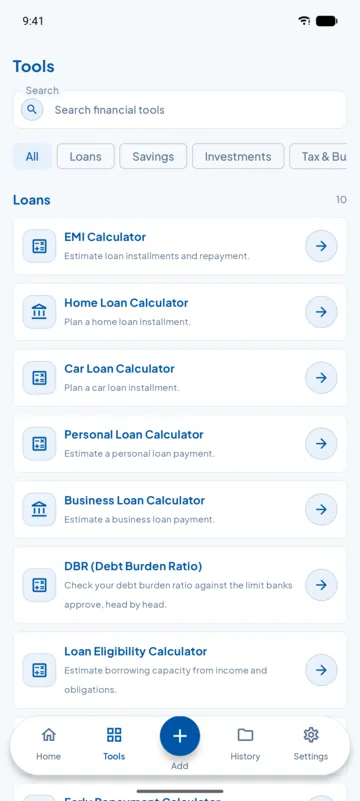
Tools catalog with search, category filters and the list of loan calculators
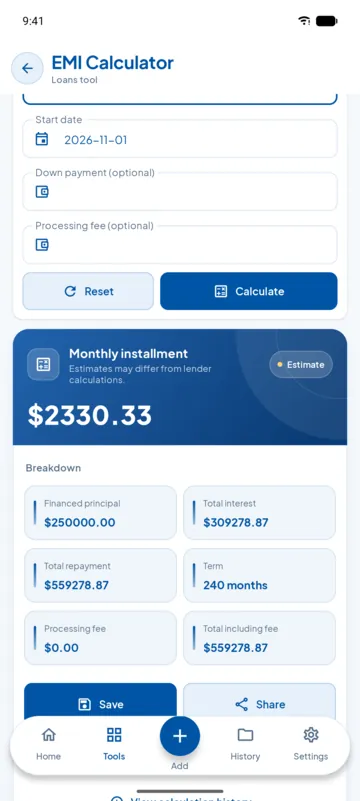
EMI calculator result with monthly installment and breakdown
Calculator catalog

All 33 FinVault calculators

Filter by category or search for the tool you need. Tools marked Monthly schedule also show a period-by-period timeline.

Loans 10 tools

  • EMI Calculator

    Monthly installment, financed principal, total interest and total repayment, with optional down payment and processing fee.

    Monthly schedule
  • Home Loan

    Plan the monthly installment for a home loan.

  • Car Loan

    Plan the monthly installment for a car loan.

  • Personal Loan

    Estimate a personal loan payment.

  • Business Loan

    Estimate a business loan payment.

  • DBR (Debt Burden Ratio)

    Check your debt burden ratio head by head across income and obligations, with a Safe, Moderate or High verdict and your headroom to 50%.

  • Loan Eligibility

    Estimate how much you could borrow from your income and existing obligations.

  • Loan Comparison

    Compare two loan offers and see which costs less in total repayment.

  • Early Repayment

    See your regular payment next to a higher payment that includes an extra monthly amount.

  • Credit Card Payoff

    Estimate how many months a fixed monthly payment takes to clear a card balance, and the interest paid.

Savings 5 tools

  • DPS Calculator

    Estimated maturity of a recurring deposit, with deposit timing, tax rate and charges.

    Monthly schedule
  • FDR Calculator

    Fixed deposit maturity with simple or compound interest, compounding frequency, tax and charges.

    Monthly schedule
  • Savings Goal

    Find the monthly saving needed to reach a goal from what you've already saved.

  • Monthly Deposit

    Project the maturity of fixed monthly deposits.

  • Emergency Fund

    Set a target emergency reserve from your essential monthly expenses and months of cover.

Investments 5 tools

  • SIP Calculator

    Future value of a monthly investment with an optional annual step-up and inflation-adjusted value.

    Monthly schedule
  • Compound Interest

    Project compound growth with monthly, quarterly, half-yearly or yearly compounding.

  • Investment Return

    Gain and total return rate from what you invested and what it's worth now.

  • Inflation

    Estimate the future cost of today's amount at an annual inflation rate.

  • Retirement Savings

    Project a retirement balance from current savings and a monthly contribution.

Tax & Business 7 tools

  • Income Tax

    Estimate remaining tax from employment, business and rental income, deductions and tax already paid, at a flat planning rate you set.

  • VAT

    Add VAT to a base amount, extract it from a total, or calculate the tax only.

  • GST

    Calculate GST in the same three modes, shown as CGST and SGST halves or as IGST.

  • Profit Margin

    Profit and margin percentage from revenue and cost.

  • Markup

    Selling price from cost and a markup percentage.

  • Discount

    Final sale price and how much you save.

  • Break-even

    Units and revenue needed to cover your fixed costs.

Personal Finance 6 tools

  • Zakat Calculator

    Estimated Zakat from cash, bank balance, savings, gold, silver and investments, less short-term liabilities, checked against your nisab threshold.

  • Age Calculator

    Exact age in years, months and days, next birthday and days lived.

  • Monthly Budget

    Your monthly balance from income, expenses and savings.

  • Net Worth

    Total assets less total liabilities.

  • Percentage

    Work out a percentage of any amount.

  • Simple Interest

    Simple interest and total value for a principal, rate and tenure.

No calculators found.

Monthly schedules

See every month of your loan or deposit

Tap Monthly details on an EMI, DPS, FDR or SIP result to open a full projection, built from the start date you entered.
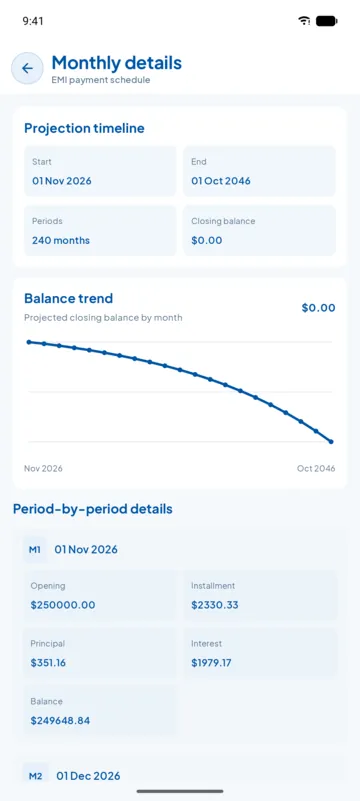
  • Overview. Start and end dates, number of periods and the closing balance.
  • Balance chart. Watch a loan balance fall or a deposit grow over the term.
  • Period-by-period rows. Dated rows with principal, interest and balance for each period.
Monthly details for an EMI: projection timeline, balance trend chart and period-by-period details
Financial reminders

Alarm-style reminders for every due date

Create a reminder in seconds with quick picks for tomorrow, next week or next month, or choose your own date and time.
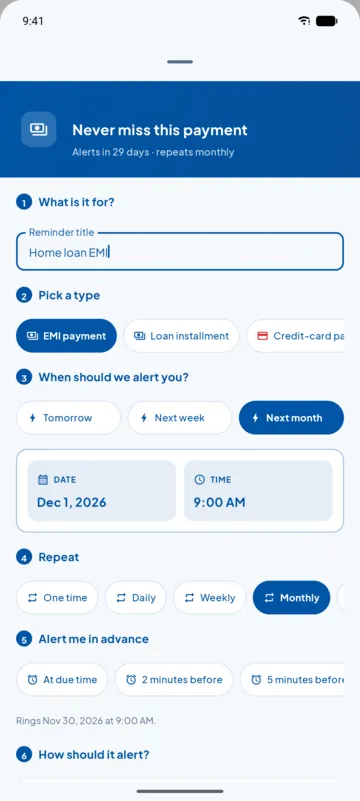
  • 17 reminder types for loans, cards, deposits, bills and taxes.
  • 7 repeat options: one time, daily, weekly, monthly, quarterly, half-yearly or yearly.
  • Alert in advance: at the due time, or 2, 5, 10, 15 or 30 minutes, 1, 2, 3, 6 or 12 hours, or 1, 3 or 7 days before.
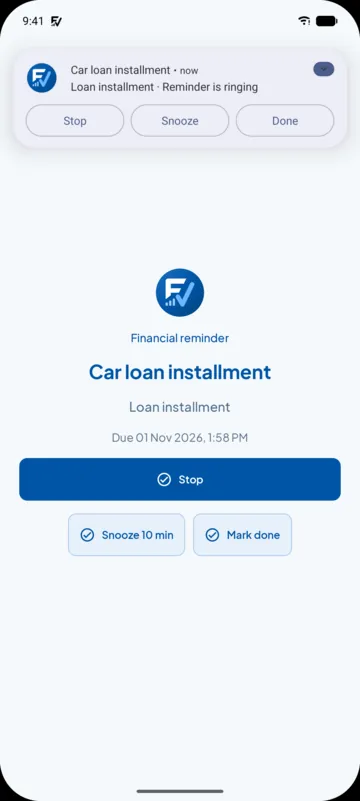
  • Rings like an alarm. A full-screen alert with your chosen sound and vibration. It rings for 1, 2, 5 or 10 minutes, or until you stop it.
  • Stop, Snooze or Done. Act from the alert screen or the notification. Snooze rings again in 10 minutes.
  • Stop with the power button. Optionally end a ringing alert when the screen turns off.
  • Manage easily. Pause, resume, edit, mark done or delete any reminder.
  • Missed alerts. If an alert couldn't ring on time, you get a “missed reminder” notification instead.
  • Reliable. Reminders are rescheduled automatically after a restart, an app update or a time or time-zone change.

Reminder types

  • EMI payment
  • Loan installment
  • Credit-card payment
  • DPS deposit
  • SIP investment
  • FDR maturity
  • Savings deposit
  • Utility bill
  • Rent payment
  • Insurance premium
  • Income tax payment
  • VAT payment
  • GST payment
  • Zakat planning
  • Subscription payment
  • Business payment
  • Custom financial reminder
New reminder form with reminder type, quick date picks, repeat and advance alert
Full-screen reminder alert with Stop, Snooze 10 min and Mark done
Money records

Record income, expenses, savings and debts

The centre Add button opens Quick Add. Pick a record type and follow four short steps: amount & category, details, an optional reminder, then review & save.

Income

Salary, business, freelance, bonus, interest, investment return, gift or other.

Expense

Food, shopping, transport, utility bill, rent, education, medical, family, business, subscription, loan payment or other.

Savings or investment

General savings, DPS, SIP, FDR, retirement, emergency fund or other investment.

Loan or debt

Bank loan, personal loan, credit card, borrowed money, lent money, business debt or other.

Financial note

A titled note filed as general, payment, tax, investment or reference.

Remind me

Add a reminder to any record. Editing or deleting the record updates its reminder too.
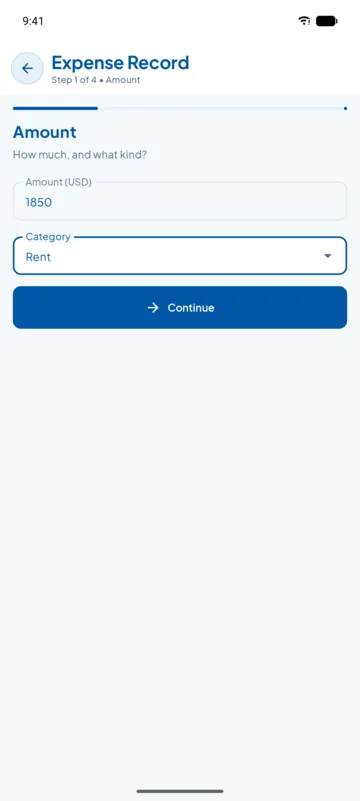
Expense record wizard, step 1: amount and category
Financial Records list showing a saved monthly salary income record
History & sharing

Save results and share them your way

Tap Save on any result to keep it in History, newest first, with the tool, date and full breakdown.
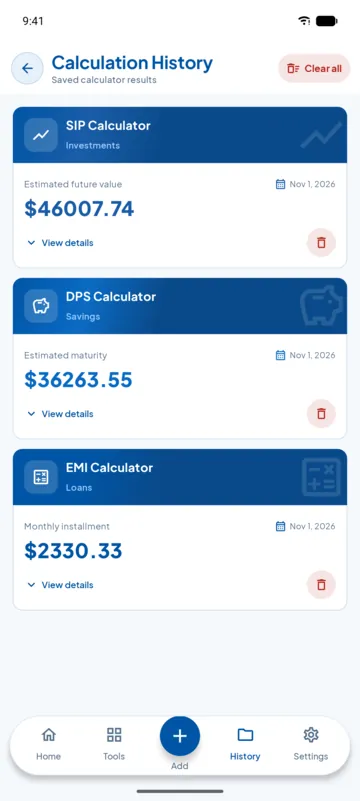
  • Review any time. Expand a saved result to see every figure again.
  • Tidy up. Delete one result or clear your whole history, with a confirmation first.
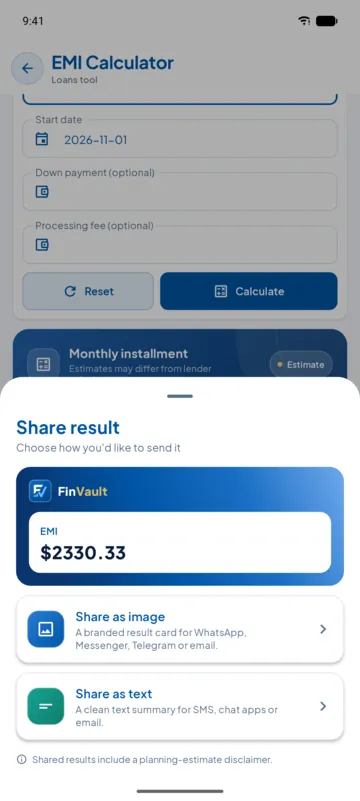
  • Share as an image. A clean, branded result card for WhatsApp, Messenger, Telegram or email.
  • Share as text. A plain-text summary for SMS, chat apps or notes, with a planning disclaimer.
Calculation History with saved SIP, DPS and EMI results
Share result sheet with Share as image and Share as text
Home & notifications

Everything important, one tap away

The home screen brings your tools, reminders and saved results together, and the bell keeps your updates in one place.
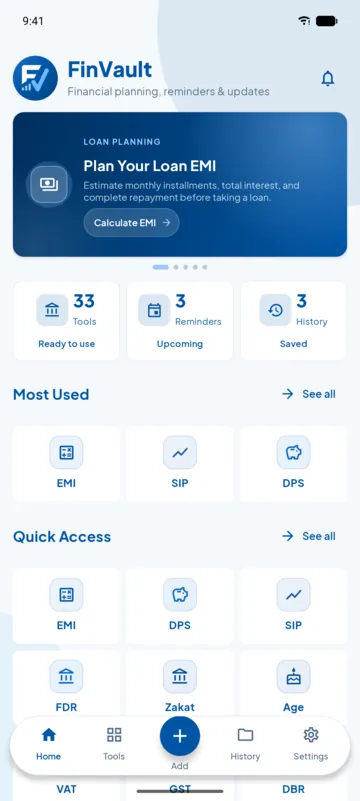
  • Home overview. A feature slider, counts of your tools, reminders and saved results, Most Used and Quick Access shortcuts, your next reminders and recent history.
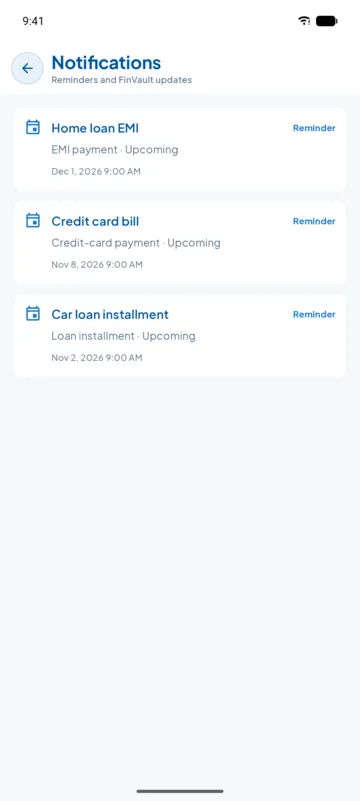
  • Notification Center. FinVault updates and your reminders in one feed, with “New” markers and mark-all-read.
  • Quick Add. Create a reminder or any of the five record types from the centre button.
  • Guided introduction. A short welcome tour on first launch, which you can replay from Settings.
FinVault home screen with summary counts, Most Used and Quick Access
Notification Center with reminder entries
Personalization

Made to fit the way you work

  • 9 currencies: USD, BDT, EUR, GBP, INR, AED, SAR, CAD and AUD. The currency sets the symbol on results; FinVault doesn't convert between currencies.
  • Calculator defaults: tenure unit, compounding frequency, interest method and deposit timing.
  • Reminder defaults: sound, advance alert, repeat, alert duration, vibration and stop-on-power-button, applied to new reminders.
  • Appearance: light, dark or follow the system theme, and reduced motion for the home background.
  • Reminder access shortcuts: jump to Android's notification, exact-alarm and full-screen alert settings from one screen.
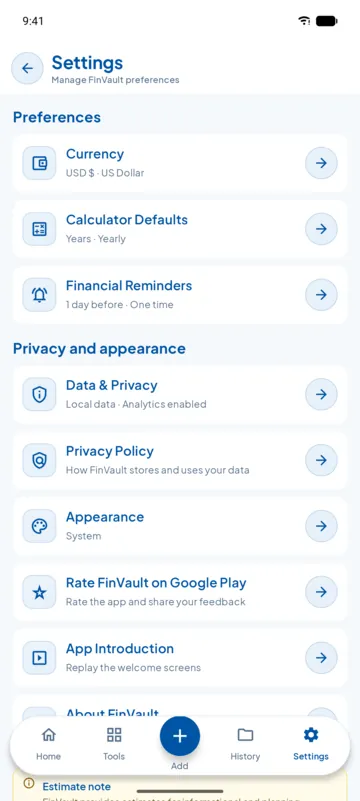
Settings: currency, calculator defaults, financial reminders, data and privacy, appearance
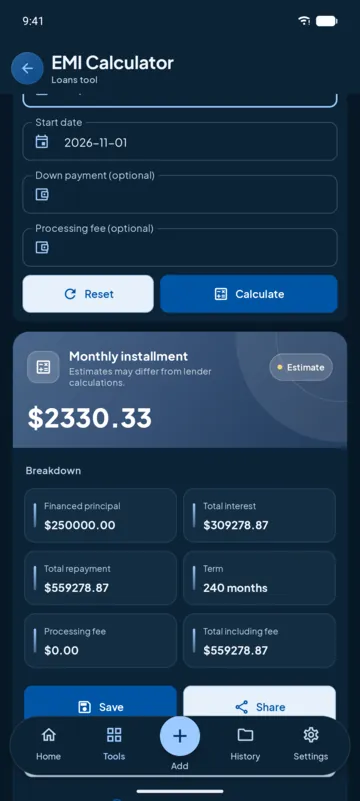
EMI calculator result in the dark theme
Privacy & security

Private by design

FinVault is built so your financial information never has to leave your phone.

No account

No sign-up, no login and no password. Open the app and start calculating.

Stored on your device

Results, records, reminders and notes live in the app's private storage and are excluded from cloud backup and device transfer.

Works offline

Every calculator, record and reminder works without an internet connection.

No financial data in analytics

Anonymous usage analytics and crash reports never include amounts, results, titles, notes or search text.

One switch to opt out

Turn analytics and crash reports off in Settings → Data & Privacy.

Minimal permissions

No location, contacts, camera, microphone, photos or files. Notification and alarm access are used only for your reminders.

Details

App information

PlatformAndroid 7.0 (Nougat) or later, phones and tablets
PriceFree, with no ads, in-app purchases or subscriptions
AccountNot required
InternetNot required for any feature
LanguageEnglish
CategoryFinance
Current version1.0.0
DeveloperApps Bean Technologies, Gazipur, Bangladesh

Ready to plan with confidence?

Get FinVault free on Google Play and have your first answer in seconds.

FinVault provides estimates for planning only. Actual bank, tax and regulatory figures may differ. FinVault does not provide financial, tax or religious advice.